 Space Focus
Phone distractions
Use a Timer to Reduce Phone Distractions
Most phone distractions are not decisions. They are reflexes — a two-second reach for the phone the moment a task gets difficult. You do not need to delete every app to fix that. You need a small, visible cost at the moment of the reflex.
Why blocking apps often fails
App blockers and strict detox rules work for a few days, then get switched off because they block the useful parts of the phone too. The alternative is narrower: make leaving your current task noticeable during a defined window, and leave the phone fully usable outside it.
The five-second rule
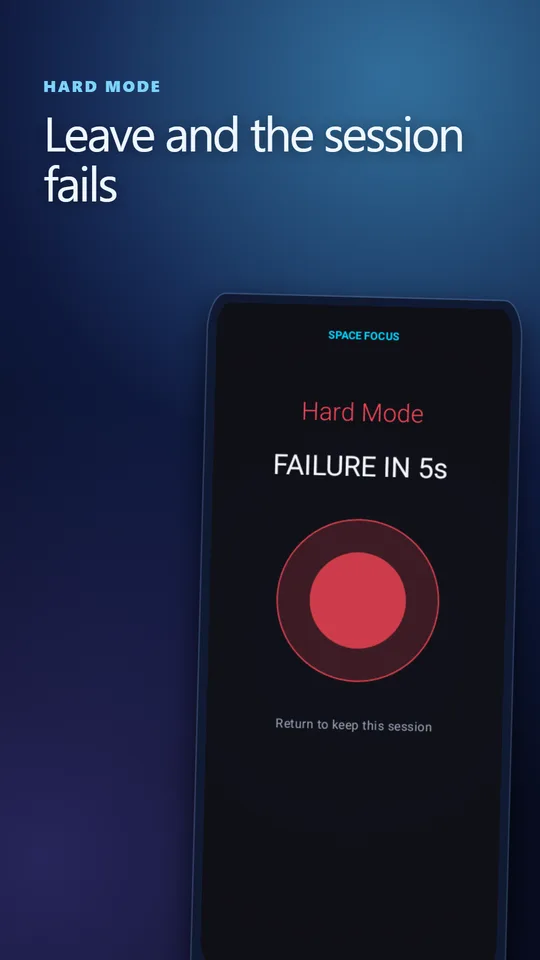
Hard Mode in Space Focus is built on this idea. During a session, switching to another app starts a countdown. You have five seconds to come back. Return and the session continues; stay away and it fails.
Five seconds is long enough to change your mind and short enough that "I'll just check one thing" does not fit. Most people find that seeing the countdown is enough to break the reflex. The phone still works — you just have to consciously choose to end the session.
Silence the phone for the session only
Notifications are the other half of the problem. If you grant Do Not Disturb access, Hard Mode can silence notifications for the length of the session and restore them afterwards. That is easier to live with than a permanent notification purge, and you do not have to remember to switch DND off.
Remove the friction to start
Distraction wins when starting focus takes effort. Put the start button in reach:
- Home-screen widget with 15, 25 and 50 minute buttons.
- Quick Settings tile for a 25-minute session from the notification shade.
- App icon shortcuts — long-press for 25, 50 minutes or a custom length.
A distraction-proof routine for a hard day
- Write the task in one sentence.
- Start a 25-minute Hard Mode session from the widget or tile.
- Put the phone face down, out of arm's reach if possible.
- When the urge to check comes, note it on paper instead of acting on it.
- Use the break to check messages deliberately — then start the next round.
Failed sessions are data, not guilt. If you keep failing at minute 15, try 15-minute sessions for a few days, then grow. The history of completed and unfinished sessions shows exactly where attention breaks down.
Keep the display calm
A busy timer screen can become a distraction of its own. Space Focus uses a single visual Pulse — Standard, Nebula, Wave or Thread — with no characters, rewards or task lists. You can also let the screen lock; the session keeps its saved deadline.
When it is more than a habit
A timer can help build a routine, but it is not treatment for ADHD, anxiety or compulsive phone use. If distraction is seriously affecting your work, study or wellbeing, talk to a qualified professional.
Frequently asked questions
How does Hard Mode stop phone distractions?
When you leave the app during a session, a five-second countdown starts. If you return, the session continues; if not, it fails. The visible cost interrupts the reflexive app switch without blocking your phone.
Does Space Focus block other apps?
No. It does not lock you out of other apps. It makes leaving a session a conscious choice and can silence notifications during the session if you grant Do Not Disturb access.
Do I need an account to track sessions?
No. Session history and statistics are stored on your device and no account is required.
Sources and further reading
How this article was created
This article was drafted with the help of artificial intelligence and edited against the app's published feature list. The independent developer is responsible for publication and accepts correction reports. Verify health, safety, legal, financial and official requirements with a primary source or qualified professional.
Questions and corrections: brightwaveapp@gmail.com. Legal and privacy information.